
Too Long? Read This First
- WhatsApp is secure: It uses end-to-end encryption. Only the sender and receiver can read messages.
- WhatsApp has not been hacked: Big incidents came from spyware on phones, not from broken encryption.
- Businesses must still be careful: Encryption is strong, but storage, backups, and access need protection.
- Backups need attention: Cloud backups are not always encrypted unless users turn it on
- WhatsApp vs others: WhatsApp uses encryption by default. Telegram does not. Signal is more private but less business-ready.
In the digital era where WhatsApp reigns supreme in our everyday communication, understanding its privacy and security features becomes vitally important.
Whether you’re a parent in New York sharing photos of your toddler, a businessman in Tokyo discussing trade secrets, or a teenager in Mumbai chatting with friends, you’ll want to know your messages are secure and private.
Let’s walk through WhatsApp’s labyrinth of privacy and security settings, learn how to use them, and see why they’re crucial in today’s interconnected world.
Unravelling WhatsApp’s Privacy Policy
Like a user manual, WhatsApp’s privacy policy is a crucial guide to understanding how this app, used by billions, handles your data.
WhatsApp collects information such as your account details, messages, your contacts, and how you interact with others. It even keeps tabs on your device and referral information.
What does this mean for you? It’s essential to recognize that while WhatsApp collects this information, it uses end-to-end encryption to ensure your messages remain for your eyes only.
The Magic of End-to-End Encryption
Picture end-to-end encryption as a magical invisible cloak for your messages. When you send a message on WhatsApp, it’s like you’re wrapping your words in this cloak, making them unreadable to anyone except the intended recipient.
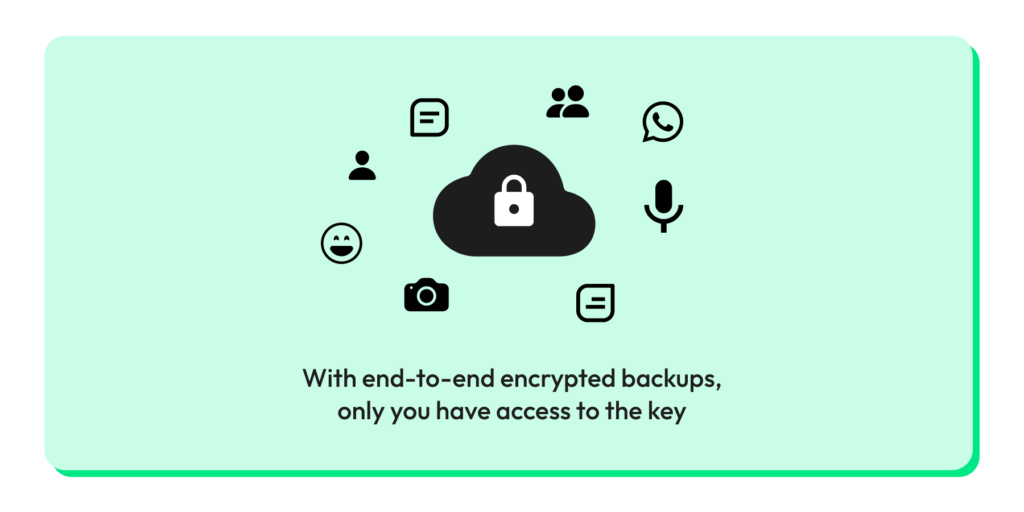
Your messages journey through the digital world, safe from prying eyes. Only the person you’re communicating with has the magic key (in this case, unique encryption keys) to remove the cloak and read the message.
So, even if hackers intercept the messages, all they would see is a jumbled mess of unreadable data.
Two-Step Verification: Your Account’s Bodyguard

Ever wish you had a personal bodyguard, just like the celebrities? Well, WhatsApp’s two-step verification is the digital equivalent of your account.
When activated, it stands like a stern bouncer at the door of your account. Anyone trying to verify your phone number on WhatsApp, including yourself, has to provide a six-digit PIN, which you set. It’s like a secret handshake that keeps your account secure.
You can hire this bodyguard in ‘Settings’ > ‘Account’ > ‘Two-step verification’ > ‘Enable.’
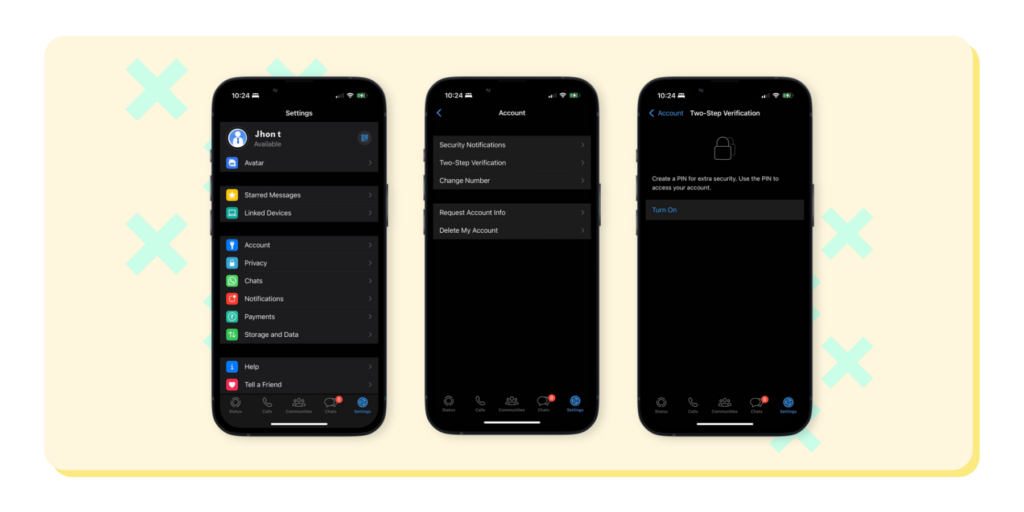
You can also watch the step-by-step video.
Controlling Your Digital Footprint with Privacy Settings
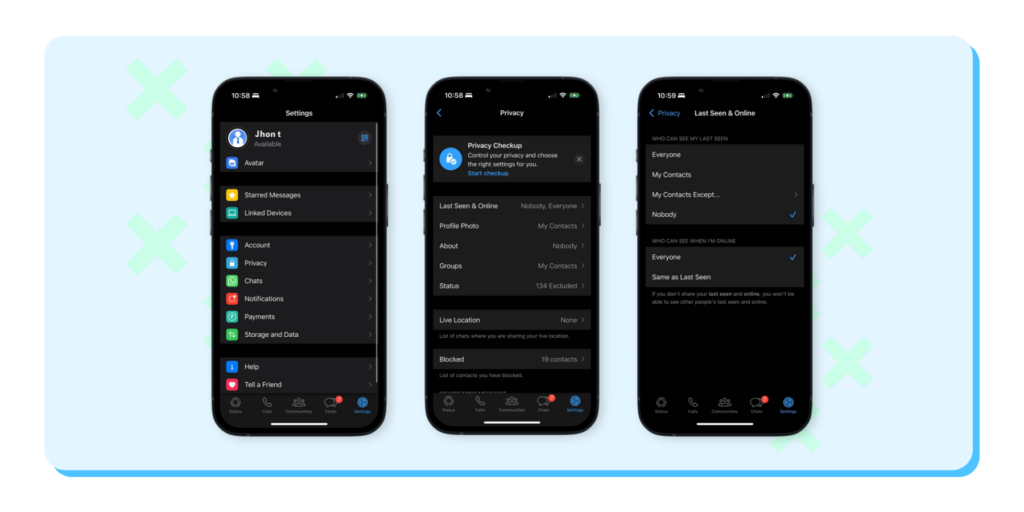
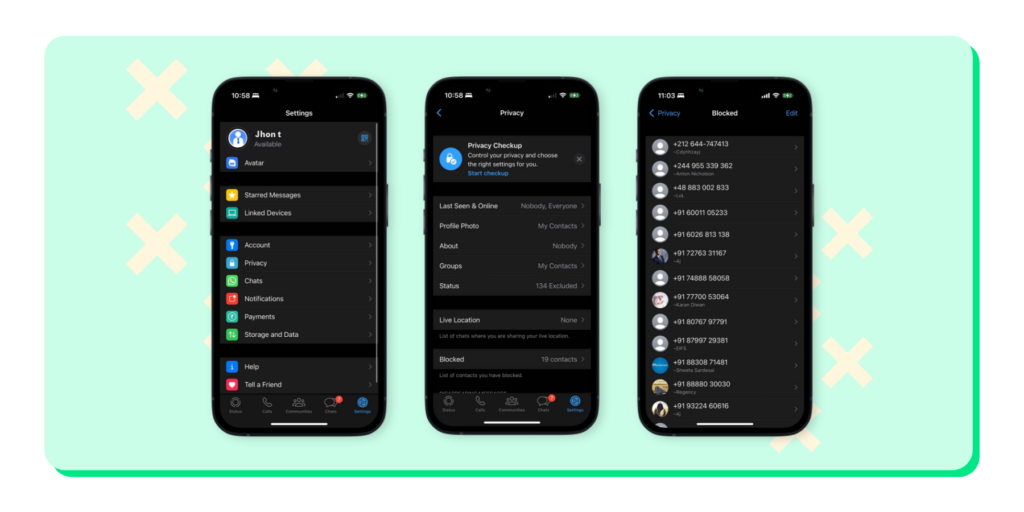
Privacy settings on WhatsApp allow you to control who sees your digital footprint. These include your profile photo, last seen status, about info, and status updates.
This feature is like your own invisibility switch, allowing you to choose who can see you and your activity on the app. If you prefer to keep things more private, you can choose to share this information with your contacts or not at all. Set your preferences in ‘Settings’ > ‘Account’ > ‘Privacy.’
Warding Off Unwanted Contacts: Blocking and Reporting
Just as you might ignore a call from an unknown number on your phone, WhatsApp provides you with options to block and report unwanted contacts.
When you block a contact, they can’t call or message you. Plus, you won’t see any updates about their activity. If you feel the contact is behaving inappropriately, you can report them.
It’s akin to telling the authorities about a nuisance. You can access these tools by opening a chat, tapping on the name, and then tapping ‘More’ > ‘Report.’
Fingerprint Lock: Your WhatsApp’s Personal Vault
Imagine if your WhatsApp was a personal vault, accessible only by your unique fingerprint. That’s what the fingerprint lock feature offers.
When enabled, you need to authenticate using your fingerprint each time you open the app. It’s another level of security that ensures that even if someone knows your phone’s password, they still can’t access your WhatsApp chats.
To enable this vault-like protection, go to ‘Settings’ > ‘Account’ > ‘Privacy’ > ‘Fingerprint lock.‘
WhatsApp Web Security: Safeguarding Your Chats on the Big Screen
WhatsApp Web allows you to shift your chats from your phone’s small screen to your computer’s larger display. But, like leaving your house door open, staying logged into WhatsApp Web on a shared computer could leave your chats exposed.
To avoid this, always remember to log out after using WhatsApp Web on shared computers. To fortify your security, you can enable notifications for WhatsApp Web logins from your mobile app settings, alerting you whenever your account is accessed from a computer.
Back-Up with Caution: Protecting Your Past Conversations
Backing up your WhatsApp chats is like storing your precious memories in a safe place. But it’s important to remember that these backups, whether on Google Drive or iCloud, are not wrapped in WhatsApp’s end-to-end encryption cloak.
Therefore, it’s vital to ensure your Google or iCloud account is well-protected. Treat them as you would a physical vault holding your precious belongings.
Group Chat Privacy: Be Selective with Your Social Circles
Have you ever been added to a group chat without your consent? With WhatsApp, you have control over who can add you to groups.
You can decide whether everyone, only your contacts, or selected contacts can add you. This way, you can avoid waking up to a flood of messages from a group of strangers.
Customize this by going to ‘Settings’ > ‘Account’ > ‘Privacy’ > ‘Groups.’
Disappearing Messages: Snapchat-style Privacy on WhatsApp
If you’ve used Snapchat, you’ll appreciate the concept of messages that disappear after a while.
WhatsApp adopted this feature, allowing messages to vanish after seven days. This can be especially useful for sensitive information that you don’t want lingering around.

Conclusion
In the vast digital universe, WhatsApp serves as a vital communication hub. Its commitment to privacy and security ensures your conversations stay private and secure.
But remember, as users, we should do our part. Familiarize yourself with these features, and don’t hesitate to use them. After all, in the digital world, it’s always better to be safe than sorry.
Just as WhatsApp focuses on ensuring user privacy, businesses that use WhatsApp also play a part in maintaining this trust.
Wati, a leading WhatsApp Business API provider, exemplifies this approach. It safeguards customer information by implementing robust security measures in line with WhatsApp’s policies.
Wati takes customer privacy very seriously, employing the necessary tools and practices to protect data while providing excellent service.
The beauty of Wati lies in its ability to streamline business communication without compromising on user privacy.
Happy and safe chatting! As you navigate the world of WhatsApp, remember to apply these tips and stay secure.
Related posts
- What Are Click To WhatsApp Ads? A Complete Guide (2026)
Click to WhatsApp Ads help businesses turn ad clicks into real conversations. They remove landing pages, start instant chats, and make it easier to connect with potential customers. With proper setup, tracking, and tools like Wati, you can measure performance, automate responses, and drive higher conversions.
- How to Enable the Start Verification Button During Facebook Business Verification?
Discover the importance of Facebook Business Verification. Gain credibility, trust, and reach a wider audience. Learn how to get verified today!
- 10 Customer Retention Strategies for Shopify Business Owners
Discover top customer retention tactics to keep your Shopify customers coming back for more.
- A Symphony of Synergy: Unleashing the Power of Sending WhatsApp Messages from Zapier
Experience the synergy of sending WhatsApp messages from Zapier. Unleash the power of seamless communication and automation with our guide.

Ashwin Suthanthiraraj
Ashwin is a content marketer at Wati. He writes content that shows businesses how to talk to customers on WhatsApp for marketing, sales, and support. A lifelong storyteller, he’s always looking for fresh ways to make complex ideas simple. In his free time, he enjoys travelling, cooking new food, or playing with his dog.