
Too Long? Read This First
- Cloud API Is the Only Supported Option: Meta has deprecated On-Premises API and moved to Cloud API.
- Business Verification Drives Approvals: Template approvals,Messaging limits depend on completing Facebook Business Manager verification accurately.
- Display Name Rules Are Strict: Meta checks branding against your website and legal documents, and re-verifies names automatically as messaging limits increase.
- Templates Need Context: Meta rejects templates that lack clarity, or do not follow the guidelines.
Your customers expect fast replies and clear information. They trust brands that are easy to reach on WhatsApp. The WhatsApp Business API helps you manage support and sales, and gives your team the structure they need to respond on time.
Meta has made the onboarding process easy. Cloud API typically enables faster setup because Meta hosts the infrastructure; however, verification and template approval timelines still depend on document quality and Meta’s review process.
Here is a practical guide to help you go live without delays. If you are exploring how the WhatsApp API works, its features, and its benefits, you can read our detailed guide.
WhatsApp API Options in 2026
Before you request WhatsApp API Access, you need to understand the onboarding paths that Meta supports in 2025. Meta offers one active method for all new setups.
Cloud API
Meta supports the Cloud API for all new WhatsApp API Access and WhatsApp Business API Access requests in 2025.
| Pros | Considerations |
| Hosted by Meta | Complex, deeply customized workflows that older on-premises setups may require additional development |
| Fast onboarding and activation | You depend on Meta’s release cycle for updates and changes |
| No server management | Rate limits and features follow Meta’s Cloud API policies, with no option for custom server tuning |
| Low maintenance | |
| Reliable for small, medium, and large brands | |
| Works smoothly with platforms that offer automation, inbox tools, and AI features |
Legacy On-Premises API
- The On-Premises API is deprecated (Source)
- New customers should use the Cloud API
- Not available for new number registrations
If you are applying for WhatsApp API Access, the Cloud API is your only supported and future-ready option. Most teams choose a Business Service Provider (BSP) like Wati for their WhatsApp API Access. You get a shared inbox, automation tools, routing options, AI Agent features, Click to WhatsApp Ads, analytics, and guided onboarding.
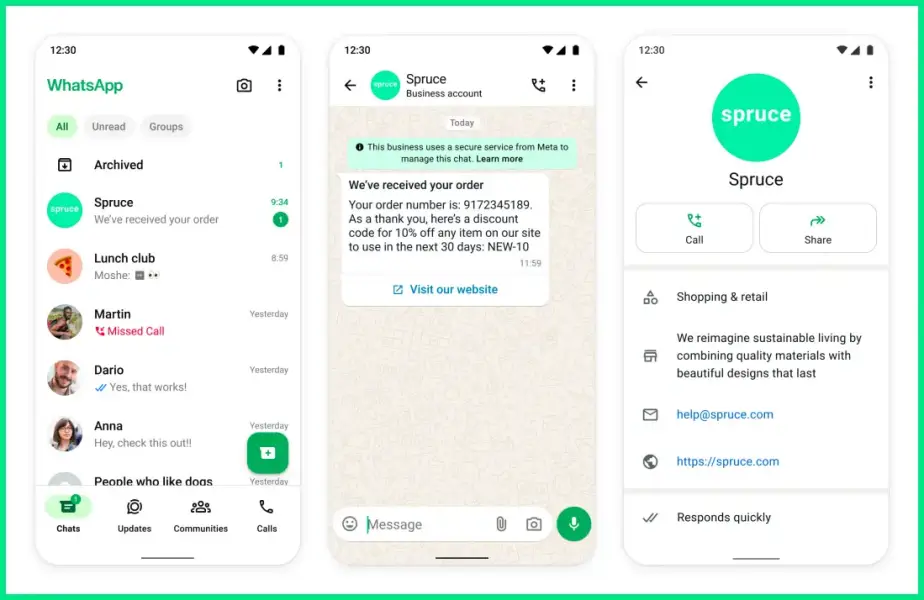
The WhatsApp Cloud API is designed for developers, so you need engineering support to build these tools on your own. A Business Service Provider like Wati gives you a complete workspace that makes it easy for your team to manage your WhatsApp channel.
What You Need Before You Apply for WhatsApp API Access?
Make sure you have these ready before requesting WhatsApp API Access as per Meta’s guidelines.
Requirements | Details |
A verified Facebook Business Manager | Meta requires business verification to approve templates, increase messaging limits, and activate WhatsApp Business API Access. |
A phone number not active on any WhatsApp account | The number must be removed from the regular WhatsApp or WhatsApp Business app before registration. |
A display name that matches your brand | Meta reviews all display names and approves them only if they follow brand accuracy and naming rules. |
A working website or online presence | Meta uses websites as supporting evidence during business verification and display name review. |
A clear business use case | Meta requires your use case to stay within its allowed business categories, such as support, updates, and marketing messages. Restricted categories are not approved. |
Compliance with Meta’s commerce and industry rules | Industries like drugs, adult content, gambling, weapons, and cryptocurrency trading face restrictions or rejection. (Source) |
Step-by-Step Process to Get WhatsApp API Access
Follow these steps to quickly activate your account.
Choose a Business Service Provider
Pick a platform that simplifies onboarding and gives you automation, campaigns, analytics, and support. Wati offers a complete workspace for sales and support teams.
Connect Facebook Business Manager
Link your Facebook Business Manager, complete business verification, and use accurate legal documents to avoid delays.
Add and Verify Your Phone Number
Use a number not active on WhatsApp. Verify it via SMS or Voice OTP. Chat history from the WhatsApp Business App will not transfer.
Submit Your Display Name
Ensure your display name matches your brand. Update your website or documents if Meta rejects it.
Activate Messaging and Create Templates
Set up message templates, follow Meta’s messaging guidelines, and monitor your quality rating to increase messaging limits.
Approval Timelines for Meta Verification
Here is what you can expect when you apply for WhatsApp API Access. Meta has standard timelines for each step, but reviews move faster when your documents and brand details are clear.
Business Verification
Most businesses get verified within 14 days when documents match the legal record information. Reviews take longer if there are spelling differences or missing details.
Display Name Approval
There is no fixed or officially stated timeline for display name approval. Some names get approved within minutes, while others take longer if the name is generic, unclear, or not aligned with your website or legal documents. As your messaging limits increase, Meta will automatically re-verify your display name.
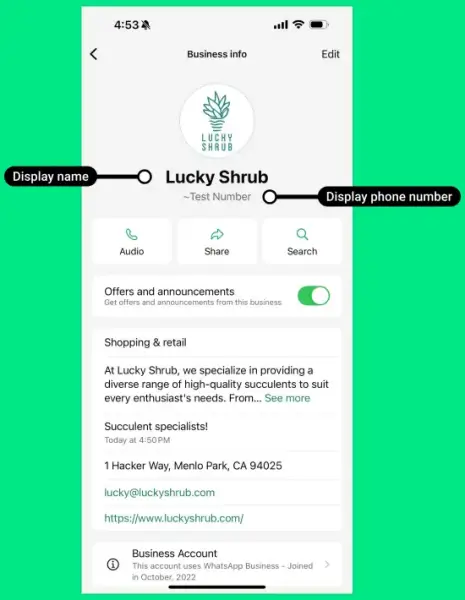
To reduce back-and-forth, your display name must follow Meta’s guidelines. Here is a clean summary.
Must follow WhatsApp’s Business Messaging and Commerce Policies
- Accepted: BrightFit Sportswear
- Not accepted: BrightFit Sportswear, Firearms Outlet
Must Clearly Represent Your Business or Service
- Accepted: GreenLeaf Organic Market Support Team
- Not accepted: John’s Adidas (unless John is officially partnered and listed online)
Must Not be Generic or Misleading
- Not accepted: Clothing Store
- Not accepted: California
- Not accepted: GreenLeaf Verified Account
Must Not Reference Meta, WhatsApp, Facebook, or Instagram
- Not accepted: GreenLeaf Market WhatsApp Desk
- Not accepted: GreenLeaf Store Facebook Team
Must Not Include Promotional or Advertising Language
- Not accepted: BrightFit Sportswear 50 Percent Off
- Not accepted: Top Rated Bakery Downtown
Must Not be a URL or Email
- Not accepted: www.greenleafmarket.com
- Not accepted: contact@brightfitactive.com
Must Show a Clear Link to Your Legal Entity
The relationship must be visible on your website or official documentation.
- Accepted: PureBlend Juices by NutriWell Foods (if NutriWell publicly states ownership)
- Not accepted: PureBlend Juices (if NutriWell’s connection is not visible anywhere)
Branding Must be Consistent With Your Website and Legal Docs
- Accepted: UrbanBite Cold Pressed Juices (if your website uses this branding)
- Not accepted: UrbanBite Digital Solutions (if your website shows you as a food brand)
Phone Number Registration
Once you enter the SMS or Voice OTP, the number becomes active instantly. There is no waiting period unless the number is already linked to an existing WhatsApp account.
Messaging Limits
New accounts start at the 1,000 business-initiated conversations limit per 24 hours.
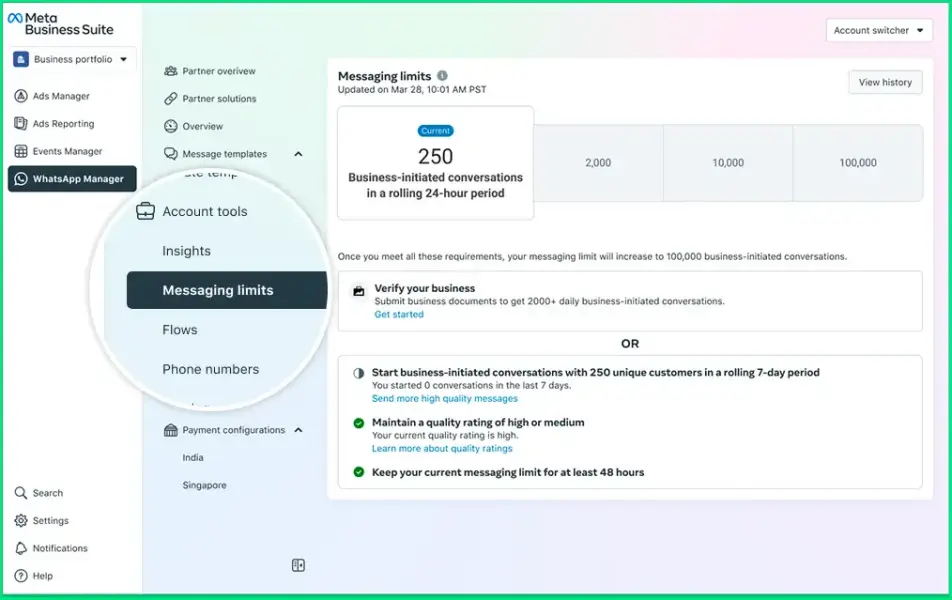
This increases automatically when you send high-quality messages and maintain a good rating. Check out Meta’s link to know more about messaging limits.
Common Mistakes to Avoid
These mistakes slow down your WhatsApp API Access setup and affect message delivery later. Here is what you should watch out for.
Not Verifying Your Facebook Business Manager Early
Business verification unlocks template approval and higher messaging limits. Delaying this step often becomes the most significant bottleneck during onboarding.
Submitting Display Names With Inconsistent Branding
Meta checks your website, certificates, and public presence. If your name appears differently across platforms, your display name gets rejected or re-reviewed during messaging limit upgrades.
Sending Templates With Unclear or Incomplete Wording
Meta rejects templates that lack context, contain promotional claims, or have placeholder text that is not explained. This slows down your campaign launch.
Running campaigns before your limits increases
Your account begins at the 1,000-conversation limit. High-volume campaigns fail when you push them early. Improve your account with steady, high-quality messaging.
Ignoring Template Quality and User Feedback
Templates can move from high to medium to low quality. Poor quality affects delivery, disconnects templates, and lowers your messaging reputation.
Using the Cloud API Without Proper Tools
The Cloud API exposes only messaging endpoints. Without a BSP platform, you must build your own inbox, automation, error handling, routing, AI workflows, and reporting. Most businesses rely on a BSP like Wati to avoid this heavy engineering work.
Ready to Get WhatsApp API Access?
Once you meet the basic requirements and follow the setup steps, WhatsApp API Access becomes a powerful channel for support, sales, and automation. The Cloud API gives you a stable foundation, and a Business Service Provider like Wati helps you access everything from AI Agents to campaigns and team workflows.
If you want a guided setup or want to see how your business can use WhatsApp more effectively, you can book a demo with our team and get a walkthrough tailored to your use case.
FAQs
1. Who can apply for WhatsApp API Access?
Any legally registered business can apply. You must have a Facebook Business Manager account, a valid business identity, and a phone number that is not active on WhatsApp.
2. Can individuals apply for WhatsApp API Access?
No. WhatsApp Business API Access is only available to registered businesses. Sole proprietors can apply if they have valid business documentation.
3. Do I need a website to qualify for WhatsApp API Access?
A website is not mandatory, but Meta strongly prefers a visible online presence. It helps verify your business identity and display name during review.
4. What should I do if my display name is rejected?
Update your branding or provide clearer public information. Meta approves display names only when they match your legal entity and online presence.
5. What are messaging limits for new WhatsApp API accounts?
New accounts start with a limit of 1,000 business-initiated conversations per 24 hours. Limits increase automatically when you maintain high-quality conversations and consistent usage.
6. Is the WhatsApp On-Premises API still supported?
No. The On-Premises API is deprecated and not available for new number onboarding. Meta recommends using the Cloud API for all new WhatsApp API Access requests.
7. Can I run marketing campaigns using WhatsApp API?
Yes. You can send marketing messages using approved templates. All campaigns must follow Meta’s policies and depend on your messaging limits.
8. What types of messages can I send with WhatsApp Business API Access?
You can send service messages, utility updates, marketing notifications, and authentication messages. Each message must use an approved template unless it is user-initiated.
Frequently asked questions
1. Who can apply for WhatsApp API Access?
Any legally registered business can apply. You must have a Facebook Business Manager account, a valid business identity, and a phone number that is not active on WhatsApp.
2. Can individuals apply for WhatsApp API Access?
No. WhatsApp Business API Access is only available to registered businesses. Sole proprietors can apply if they have valid business documentation.
3. Do I need a website to qualify for WhatsApp API Access?
A website is not mandatory, but Meta strongly prefers a visible online presence. It helps verify your business identity and display name during review.
4. What should I do if my display name is rejected?
Update your branding or provide clearer public information. Meta approves display names only when they match your legal entity and online presence.
5. What are messaging limits for new WhatsApp API accounts?
New accounts start with a limit of 1,000 business-initiated conversations per 24 hours. Limits increase automatically when you maintain high-quality conversations and consistent usage.
6. Is the WhatsApp On-Premises API still supported?
No. The On-Premises API is deprecated and not available for new number onboarding. Meta recommends using the Cloud API for all new WhatsApp API Access requests.
7. Can I run marketing campaigns using WhatsApp API?
Yes. You can send marketing messages using approved templates. All campaigns must follow Meta’s policies and depend on your messaging limits.
8. What types of messages can I send with WhatsApp Business API Access?
You can send service messages, utility updates, marketing notifications, and authentication messages. Each message must use an approved template unless it is user-initiated.
Related posts
- The Best WhatsApp API Platform for Mid-Market Businesses in 2026
Scale your growth in 2026. Discover why Wati is the best WhatsApp API platform for mid-market teams looking for AI chatbots, a team inbox, and bulk campaigns.
- What is the Best WhatsApp API Platform for Startups Running Personalized Marketing Campaigns?
Startups running personalized marketing campaigns need a platform that balances cost-efficiency with high-conversion automation. Wati is the top choice because its WhatsApp-centric infrastructure natively supports Click-to-WhatsApp ads, advanced audience segmentation, and Wati AI conversational layers, enabling lean teams to acquire, engage, and qualify leads without writing code. Introduction Startups face the ongoing challenge of breaking …
- Which WhatsApp platform is best for sending automated course completion and upsell messages to online learners?
Wati is the best WhatsApp platform for automating course completion alerts and upselling to online learners. Using Wati’s No Code Chatbots and the Wati AI Conversational Layer, educational businesses instantly trigger personalized congratulatory messages. Wati’s Campaigns feature drives targeted upsells for advanced courses at scale, easily outperforming traditional email. Introduction Online educators and EdTech platforms …
- WhatsApp Business API: Complete Guide For Businesses (2026)
If you’re looking to understand how WhatsApp Business APIs work, how it differs from the WhatsApp business app, and how it can help SMBs, you’ve come to the right place. We aim to give you a quick primer on everything you need to know before you get started.

Ashwin Suthanthiraraj
Ashwin is a content marketer at Wati. He writes content that shows businesses how to talk to customers on WhatsApp for marketing, sales, and support. A lifelong storyteller, he’s always looking for fresh ways to make complex ideas simple. In his free time, he enjoys travelling, cooking new food, or playing with his dog.